# 活動統計

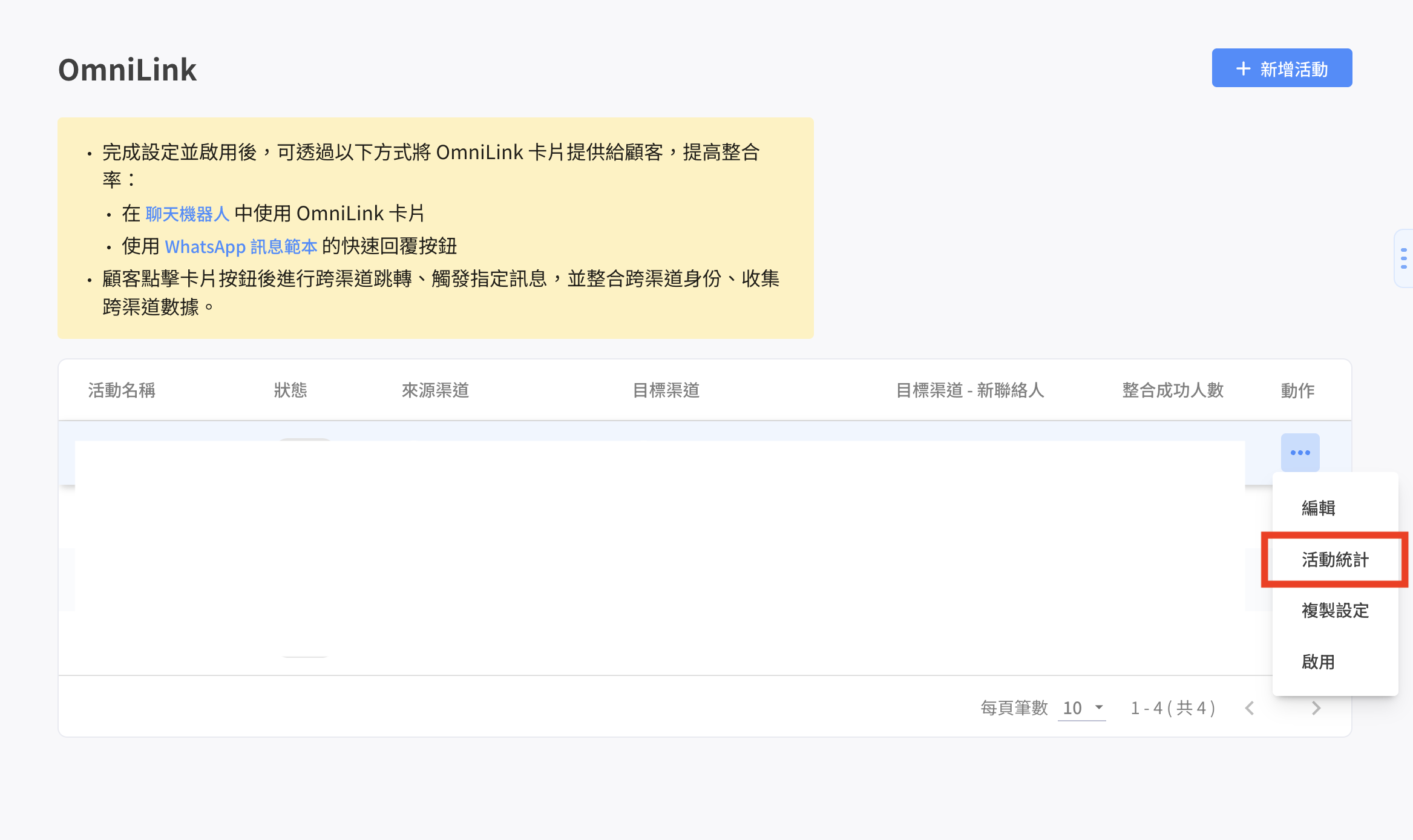
點擊 動作按鈕 > 「 活動統計 」，可查看每次活動的相關成效

<figure><img src="/files/g7AMcdy6H0AaiZqQwQPr" alt=""><figcaption></figcaption></figure>

<figure><img src="/files/A2apO0rCEEP8Qgds8JLI" alt=""><figcaption></figcaption></figure>

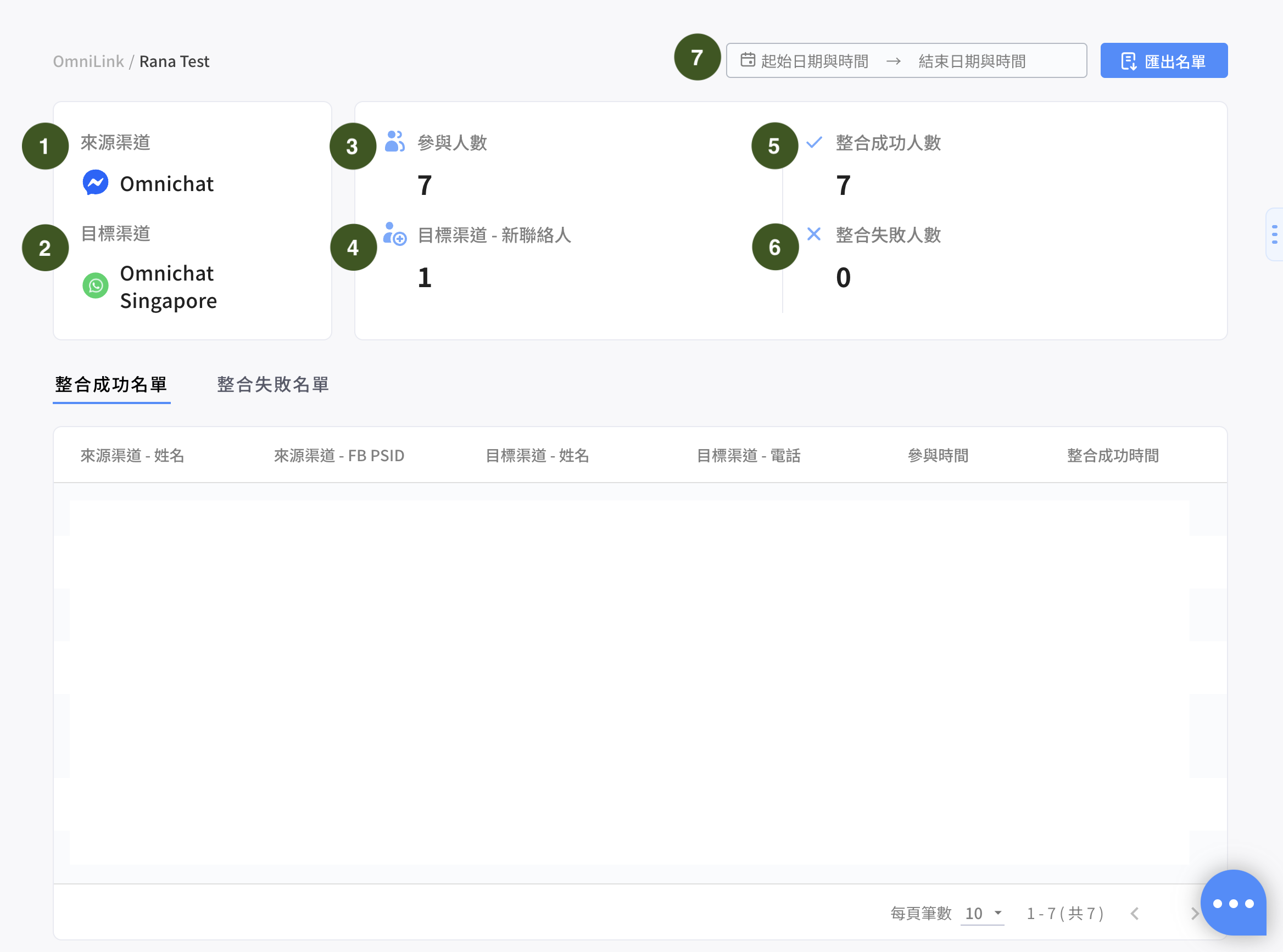
1. **來源渠道：**&#x4F86;源渠道名稱
2. **目標渠道：**&#x76EE;標渠道名稱
3. **參與人數：**&#x89F8;發卡片且第一次點擊按鈕的次數（參與人數 = 整合成功人數 + 整合失敗人數）
4. **目標渠道－新聯絡人：**&#x6574;合成功且從未存在於團隊中的 channel 聯絡人\
   （ex. 王小明原本是品牌的 FB 聯絡人，透過 OmniLink 成為 LINE 聯絡人，此時就會被認列為新聯絡人
5. **整合成功人數：**&#x89F8;發卡片且點擊後整合成功人數
6. **整合失敗人數：**
   * 觸發卡片且點擊後有儲存錯誤原因的人數
   * 沒有錯誤原因人數（點過去沒有整合成功）
7. **日期區間：**&#x53EF;篩選活動期間

#### 整合成功名單

<figure><img src="/files/ZFH0mo8fQm50bmaBAxxP" alt=""><figcaption></figcaption></figure>

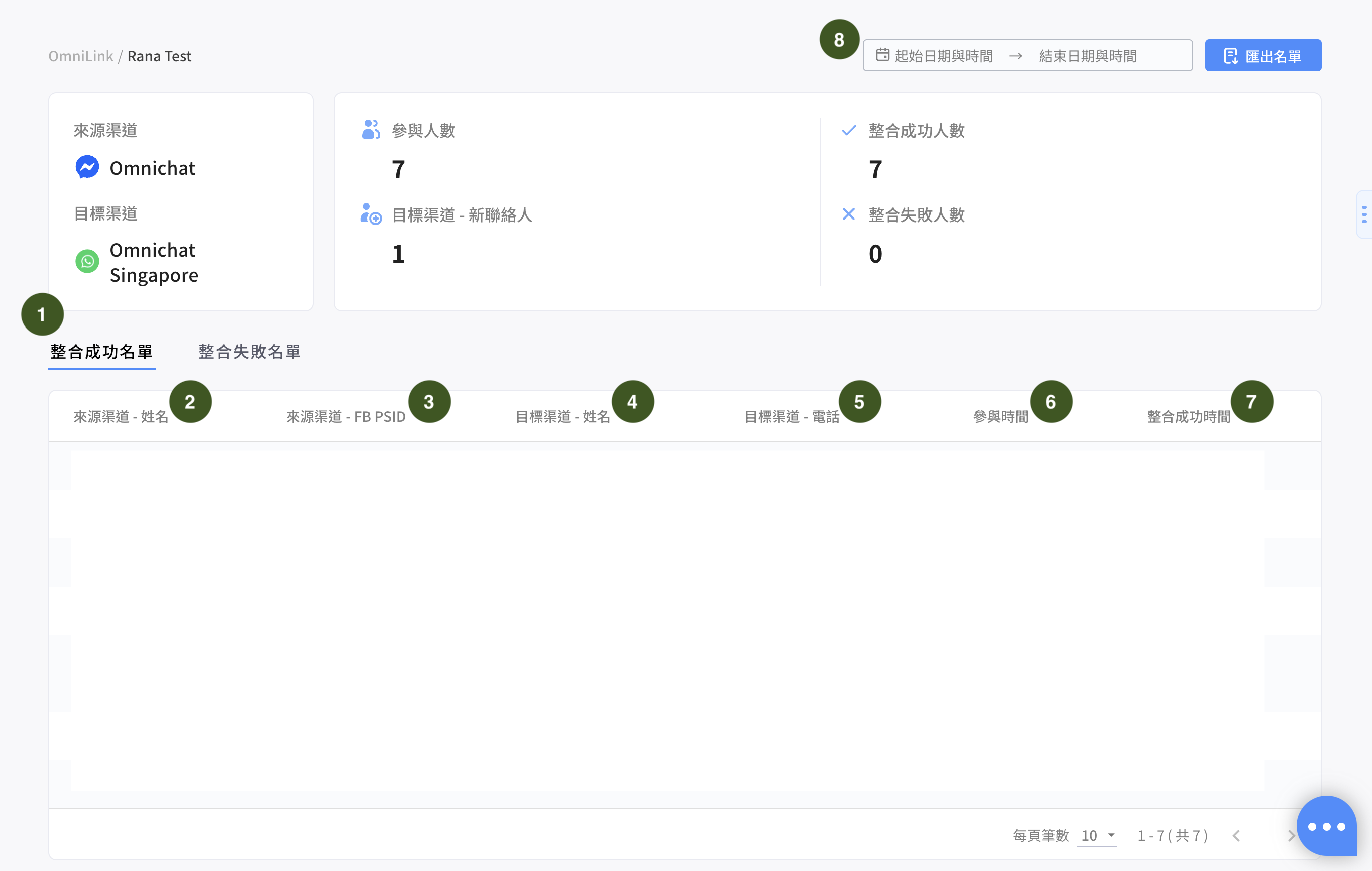
1. 整合成功名單：這邊會顯示整合成功名單
2. 來源渠道 - 姓名：顯示整合成功聯絡人的來源渠道姓名
3. 來源渠道 ID：會顯示聯絡人的來源渠道 ID
4. 目標渠道 - 姓名：顯示整合成功聯絡人的目標渠道姓名
5. 目標渠道 ID：會顯示聯絡人的目標渠道 ID
6. 參與時間：客人點擊 OmniLink 的時間
7. 整合成功時間：整合成功時間
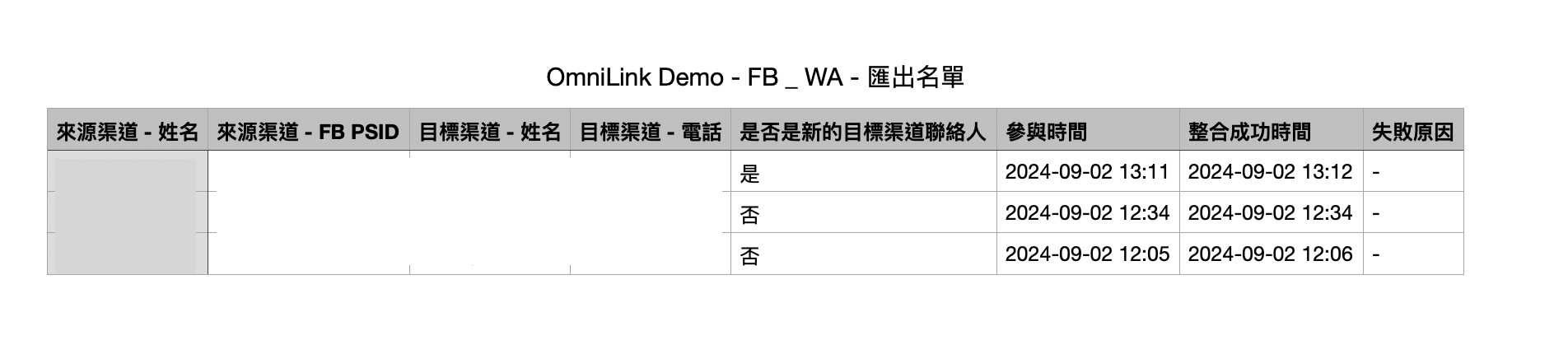
8. 匯出名單：整合成功 & 失敗的名單會一起匯出（須先選擇時間區間，且天數須小於 90 天才可匯出）

<figure><img src="/files/S9OSbnZcjL1OlPnoLKfZ" alt=""><figcaption></figcaption></figure>

#### 整合失敗名單

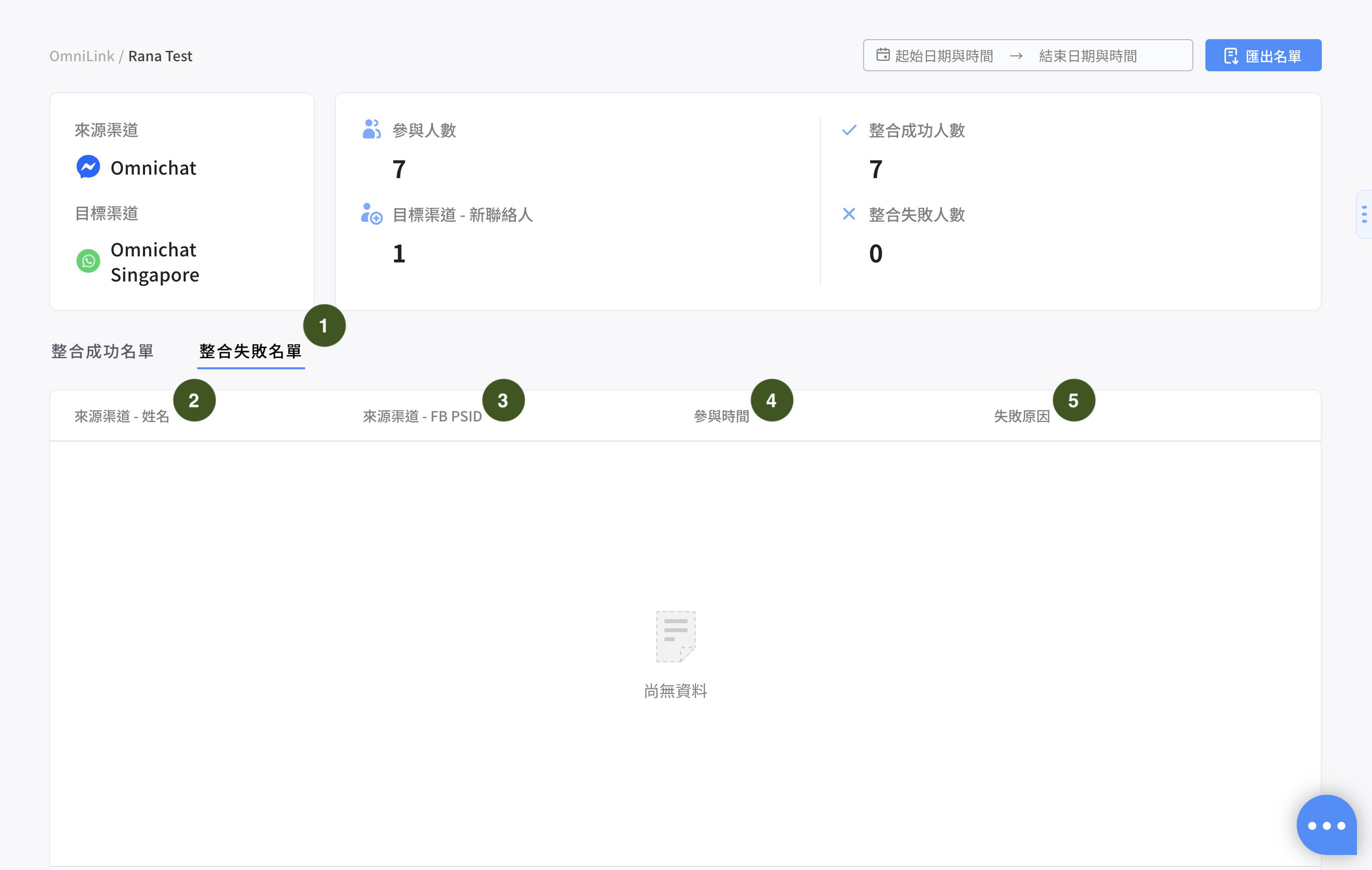
<figure><img src="/files/LLQKDSZJpBMIFx8p6o1W" alt=""><figcaption></figcaption></figure>

1. 整合失敗名單：這邊會顯示失敗名單
2. 來源渠道 - 姓名：顯示失敗聯絡人的來源渠道姓名
3. 來源渠道 ID：來源渠道的 ID
4. 參與時間：參與時間
5. 失敗原因：

<table><thead><tr><th width="273">錯誤種類</th><th>錯誤訊息（中文）</th><th>後台錯誤訊息（英文）</th></tr></thead><tbody><tr><td>無法產生 deeplink</td><td>跨社群一鍵整合已停用</td><td>Cross channel connect is disabled.</td></tr><tr><td>無法產生 deeplink</td><td>無法產生整合連結</td><td>Failed to generate connect link.</td></tr><tr><td>收到「聯絡人點擊了 deep link」的通知後，要做跨社群整合時失敗</td><td>跨社群一鍵整合已停用</td><td>Cross channel connect is disabled.</td></tr><tr><td>收到「聯絡人點擊了 deep link」的通知後，要做跨社群整合時失敗</td><td>無法找到來源渠道聯絡人</td><td>Source contact not found.</td></tr><tr><td>收到「聯絡人點擊了 deep link」的通知後，要做跨社群整合時失敗</td><td>無法找到目標渠道聯絡人</td><td>Target contact not found.</td></tr><tr><td>收到「聯絡人點擊了 deep link」的通知後，要做跨社群整合時失敗</td><td>會員編號衝突</td><td>Member ID conflict.</td></tr><tr><td>收到「聯絡人點擊了 deep link」的通知後，要做跨社群整合時失敗</td><td>伺服器錯誤</td><td>Internal server error.</td></tr><tr><td>其他未預期錯誤</td><td>因顧客未送出整合訊息或未安裝目標渠道 APP 失敗</td><td>The integration might have failed because the customer didn't submit the integration message or hasn't installed the target channel app.</td></tr></tbody></table>

* 當發生以下幾種狀況時，消費者收到「此連結不存在，請洽客服詢問」 （不會顯示在失敗原因中，會直接發送訊息給客戶）

a. 找不到整合設定\
b. 整合設定已停用\
c. 找不到來源渠道\
d. 在非來源渠道觸發跨社群一鍵整合卡片\
e. 找不到目標渠道\
f. 目標渠道是 LINE 而且沒有設定綁定 LIFF ID

* 當發生以下幾種狀況時，不會顯示失敗原因

a. 整合成功\
b. 發訊息失敗\
c. 觸發旅程失敗\
d. 貼標籤失敗\
e. 各平台發生錯誤


---

# Agent Instructions: Querying This Documentation

If you need additional information that is not directly available in this page, you can query the documentation dynamically by asking a question.

Perform an HTTP GET request on the current page URL with the `ask` query parameter:

```
GET https://docs.omnichat.ai/features/she-qun-bang-ding-guan-li/omnilink-jia-gou-gong-neng/huo-dong-tong-ji.md?ask=<question>
```

The question should be specific, self-contained, and written in natural language.
The response will contain a direct answer to the question and relevant excerpts and sources from the documentation.

Use this mechanism when the answer is not explicitly present in the current page, you need clarification or additional context, or you want to retrieve related documentation sections.