> For the complete documentation index, see [llms.txt](https://docs.omnichat.ai/llms.txt). Markdown versions of documentation pages are available by appending `.md` to page URLs; this page is available as [Markdown](https://docs.omnichat.ai/features/marketing/new-chatbot/yong-hu-shu-ru.md).
# 用戶輸入
可以讓用戶自行輸入任何格式的回答,並且回覆後觸發下個模組。適用平台:全平台。
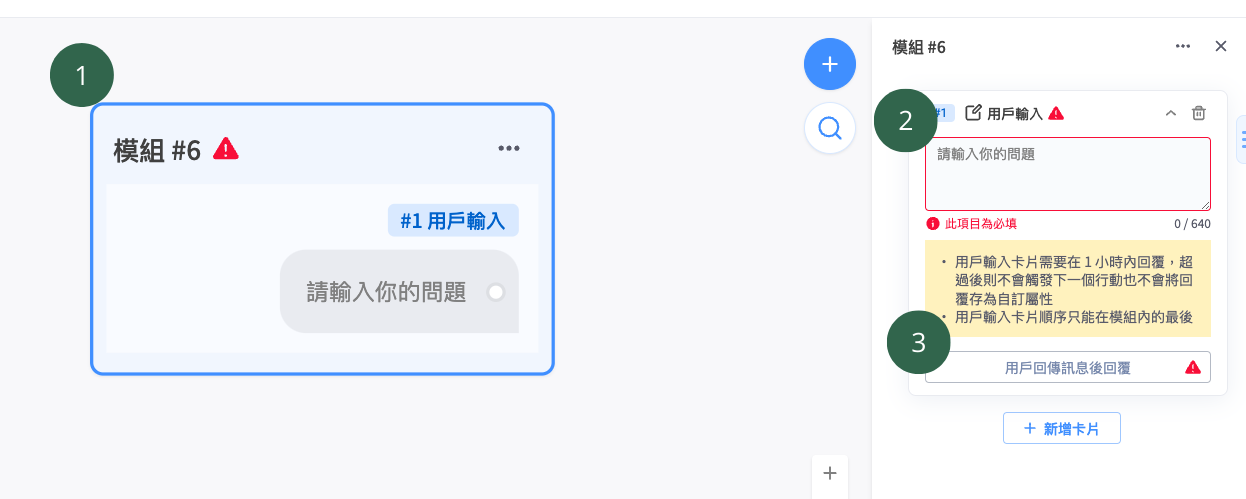
1. 輸入問題後,可以在介面上預覽呈現方式
2. 必填。可以在此輸入問題,不同平台可輸入的字數不同,詳情請參考下表。
3. 必填。可設定客人輸入回覆後要引導的模組。而附加動作可以在客人回覆文字內容時,選擇是否將客人的回覆儲存成自訂屬性(需加購)
{% hint style="warning" %}
1. 客人回傳訊息為 「**純文字訊息」、「圖片」、「影片」、「貼圖」、「emoji」** 皆能觸發至下一個對話模組
2. 該張卡片僅限定放在模組中**最後一張**,若排序在其他卡片後面無法正常顯示選項
3. 若客人超過 1 個小時才進行回覆,會無法正常觸發至下一個對話模組
4. 「快速回覆」 & 「用戶輸入」,不能同時放在同一個機器人模組中
{% endhint %}