> For the complete documentation index, see [llms.txt](https://docs.omnichat.ai/llms.txt). Markdown versions of documentation pages are available by appending `.md` to page URLs; this page is available as [Markdown](https://docs.omnichat.ai/en/features/she-ding/tong-xun-qu-dao/wang-zhan-dui-hua-cha-jian/install.md).
# Install Webchat Plugin
Take a few minutes to install Omnichat on your official website. Just paste the code on your official website to enable it.
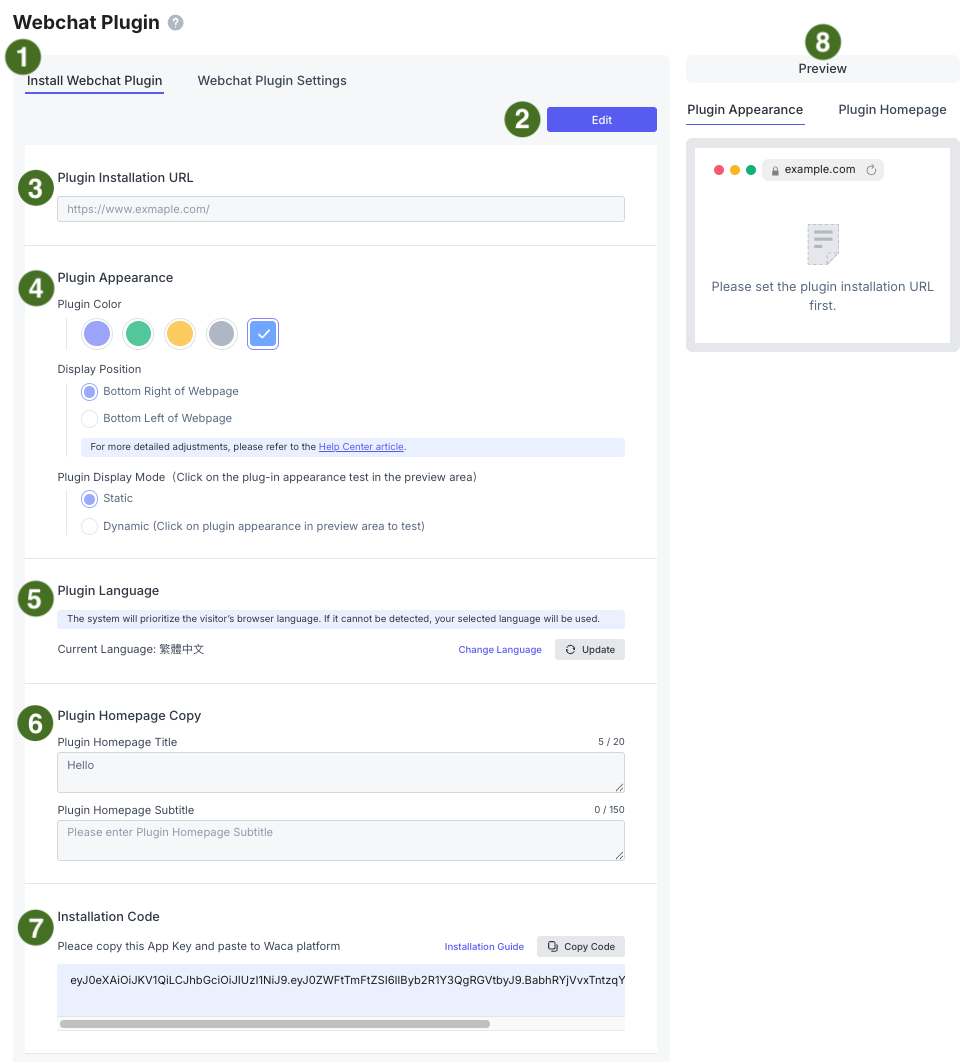
### 1. Switch to the "**Install Webchat Plugin"** tab
### 2. Click "**Edit"** to start configuring the Chat Plugin
### 3. Enter the website URL where you want to install Omnichat
If you want to install the Omnichat Webchat Plugin on multiple domains, enter multiple URLs separated by a semicolon (**;**).
Example: `https://www.omnichat.ai/;https://blog.omnichat.ai/`
The Chat Plugin code must be installed on each website by following the instructions below.
### 4. Plugin Appearance
You can customize the Chat Plugin's **color**, **position**, and **display mode**. You can preview your changes under **Preview > Plugin Appearance** on the right.
* **Position**: Choose between the **bottom-right** or **bottom-left** corner of the webpage. For more detailed positioning options, please refer to [Adjusting the display of website plugin icon](/en/features/she-ding/tong-xun-qu-dao/wang-zhan-dui-hua-cha-jian/zi-hang-diao-zheng-wang-zhan-dui-hua-cha-jian-wei-zhi.md).
* **Display Mode**: Choose between **Static** and **Dynamic**. With the Dynamic style, the Chat Plugin displays different animations when the cursor hovers over or the user clicks the plugin.
### 5. Plugin Language
The system will first use the visitor's browser language. If the browser language cannot be detected, the language configured in Omnichat will be used.
Click "**Change Language"** to go to the **Team Profile** page, where you can adjust the language under **Language (Display to customers)**.
If you change the language later, you do not need to reinstall the Chat Plugin code.
### 6. Plugin Homepage Copy
You can customize the **Plugin** **Homepage Title** and **Plugin Homepage Subtitle**. You can preview your changes under **Preview > Plugin Homepage** on the right.
* If no Homepage Title is configured, **"Hello"** will be displayed by default.
* The Homepage Subtitle can be left blank or displayed across multiple lines.
### 7. Installation Code
Select your website platform below to view the instructions for installing Omnichat on your website. Please refer to the following tutorial for installing Omnichat on your official website:
{% content-ref url="/pages/-LdvW1Hunjg3ViVJzyw0" %}
[Custom-built Website | Omnichat Installation](/en/features/she-ding/tong-xun-qu-dao/wang-zhan-dui-hua-cha-jian/install/website.md)
{% endcontent-ref %}
{% content-ref url="/pages/-LdvqkWdqTOh7tz-\_zMj" %}
[Shopify | Omnichat Installation](/en/features/she-ding/tong-xun-qu-dao/wang-zhan-dui-hua-cha-jian/install/shopify.md)
{% endcontent-ref %}
{% content-ref url="/pages/-LdvtSfcAjnEn2pE1RiD" %}
[91APP | Omnichat Installation](/en/features/she-ding/tong-xun-qu-dao/wang-zhan-dui-hua-cha-jian/install/91app.md)
{% endcontent-ref %}
{% content-ref url="/pages/-Ldwhl\_7jUrXw\_I4YUpU" %}
[WACA | Omnichat Installation](/en/features/she-ding/tong-xun-qu-dao/wang-zhan-dui-hua-cha-jian/install/waca.md)
{% endcontent-ref %}
{% content-ref url="/pages/-LdwucIBiBkdEY27RC8k" %}
[Easystore | Omnichat Installation](/en/features/she-ding/tong-xun-qu-dao/wang-zhan-dui-hua-cha-jian/install/easystore.md)
{% endcontent-ref %}
{% content-ref url="/pages/-LeAKOC63arsUSwW4EnV" %}
[SHOPLINE | Omnichat Installation](/en/features/she-ding/tong-xun-qu-dao/wang-zhan-dui-hua-cha-jian/install/shopline.md)
{% endcontent-ref %}
{% content-ref url="/pages/-LeB-zm6u72xASSTuCxH" %}
[WordPress | Omnichat Installation](/en/features/she-ding/tong-xun-qu-dao/wang-zhan-dui-hua-cha-jian/install/wordpress.md)
{% endcontent-ref %}
{% content-ref url="/pages/-LeB1kAQrlA0c9VNotKa" %}
[Magento | Omnichat Installation](/en/features/she-ding/tong-xun-qu-dao/wang-zhan-dui-hua-cha-jian/install/magento.md)
{% endcontent-ref %}
{% content-ref url="/pages/-LeB3173wIt\_aAKzk6bD" %}
[Joomla | Omnichat Installation](/en/features/she-ding/tong-xun-qu-dao/wang-zhan-dui-hua-cha-jian/install/joomla.md)
{% endcontent-ref %}
{% content-ref url="/pages/-LeB4BWnVYSM7Pj6Z\_Be" %}
[Drupal | Omnichat Installation](/en/features/she-ding/tong-xun-qu-dao/wang-zhan-dui-hua-cha-jian/install/drupal.md)
{% endcontent-ref %}
{% content-ref url="/pages/-LeB6HB6QLmIFvgdl5r\_" %}
[Opencart | Omnichat Installation](/en/features/she-ding/tong-xun-qu-dao/wang-zhan-dui-hua-cha-jian/install/opencart.md)
{% endcontent-ref %}
{% content-ref url="/pages/-LeB7JzOI1ToE3BJSa4C" %}
[Squarespace | Omnichat Installation](/en/features/she-ding/tong-xun-qu-dao/wang-zhan-dui-hua-cha-jian/install/squarespace.md)
{% endcontent-ref %}
{% content-ref url="/pages/-LeBAisKxc6uJLm73cXr" %}
[Weebly | Omnichat Installation](/en/features/she-ding/tong-xun-qu-dao/wang-zhan-dui-hua-cha-jian/install/weebly.md)
{% endcontent-ref %}
{% content-ref url="/pages/-LeBBZzB31EFvhUvucNG" %}
[Bigcommerce | Omnichat Intallation](/en/features/she-ding/tong-xun-qu-dao/wang-zhan-dui-hua-cha-jian/install/bigcommerce.md)
{% endcontent-ref %}
{% content-ref url="/pages/-LeBCJVUrXha7wcHNxJQ" %}
[Strikingly | Omnichat Installation](/en/features/she-ding/tong-xun-qu-dao/wang-zhan-dui-hua-cha-jian/install/strikingly.md)
{% endcontent-ref %}
{% content-ref url="/pages/-LeBCt54\_u1fR4WAZQB2" %}
[Google Tag Manager | Omnichat Installation](/en/features/she-ding/tong-xun-qu-dao/wang-zhan-dui-hua-cha-jian/install/google-tag-manager.md)
{% endcontent-ref %}